
Insure Your Apple Gear Without Going Broke
The Real Cost of Protecting Your Apple Devices on a Student Budget
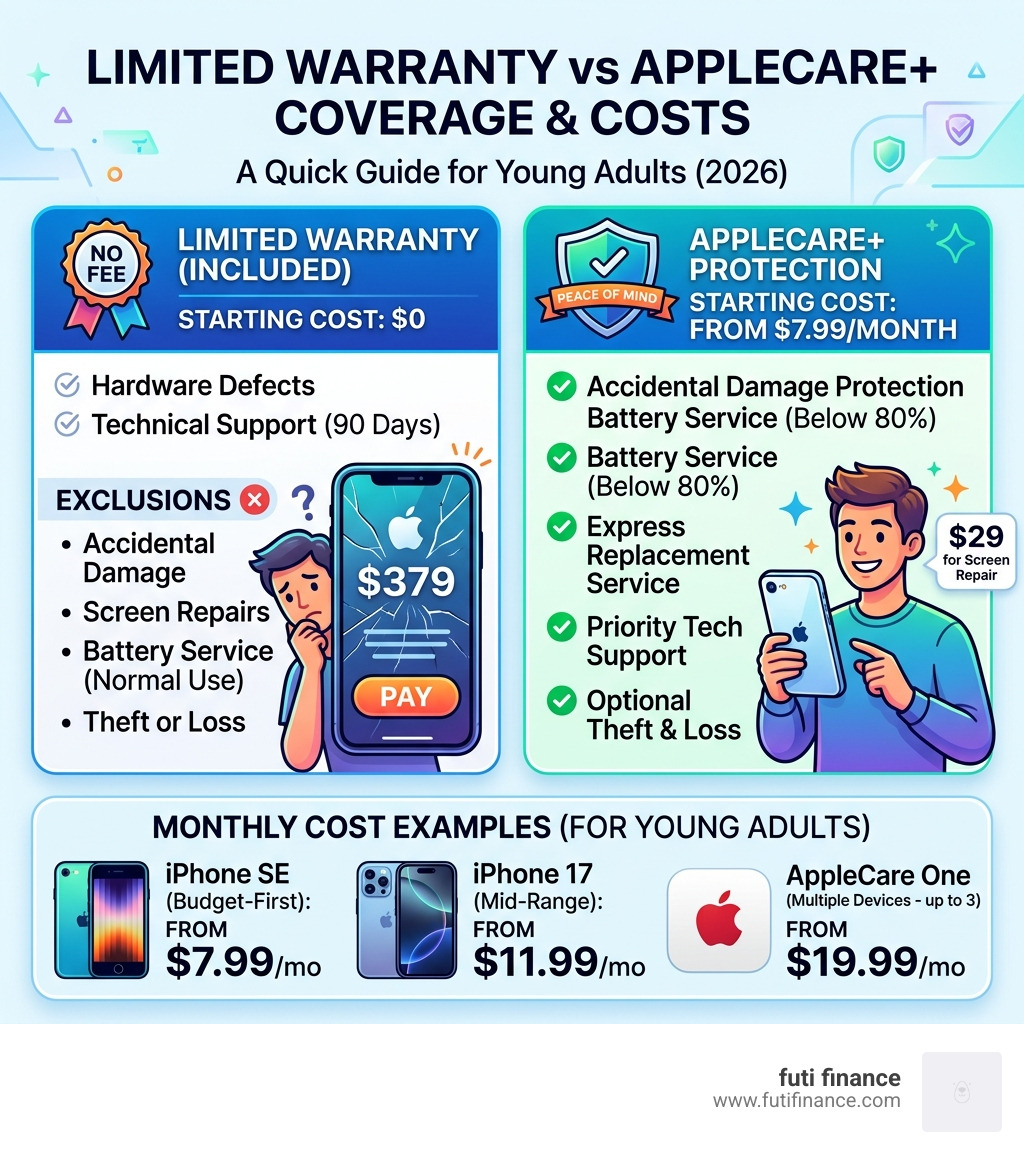
Apple insurance young adults cheap options do exist — and they’re more accessible than most students realize. Here’s a quick look at the most affordable ways to protect your Apple gear in 2026:
| Plan | Best For | Starting Cost |
|---|---|---|
| AppleCare+ (iPhone SE) | Budget-first, single device | $7.99/month |
| AppleCare+ (iPhone 17) | Mid-range iPhone coverage | $11.99/month |
| AppleCare One | Multiple Apple devices | $19.99/month (up to 3 devices) |
| iPhone Upgrade Program (Education) | Students upgrading annually | From $42.41/month (includes AppleCare+) |
Your iPhone screen cracks. Repair without coverage: $379. Repair with AppleCare+: $29. That’s not a small difference when you’re on a student budget.
Apple devices are expensive to fix. A single drop can cost more than a month’s rent in some cities. Yet most young adults skip device protection entirely — usually because they assume it’s too pricey or too complicated.
It doesn’t have to be either.
AppleCare+ and the newer AppleCare One plan give budget-conscious users real protection against accidents, theft, and loss — often for less than the price of a streaming subscription per week. And with options starting as low as $7.99 a month, there’s likely a plan that fits your budget without stretching it.
This guide breaks down every plan, every price, and every scenario so you can make a smart choice — not just a rushed one at the checkout counter.
Understanding AppleCare+ and AppleCare One
When we talk about protecting our tech, it’s important to distinguish between the basic warranty and the paid protection plans. Every new Apple device comes with a one-year limited warranty. This covers hardware defects (like a button that stops clicking), but it won’t help you if your phone takes a dive into a puddle or hits the pavement.
That’s where AppleCare+ and the newer AppleCare One come in.

AppleCare+ is the traditional plan we all know. It covers a single device. You pay a monthly or upfront fee, and in exchange, you get accidental damage protection, 24/7 priority support, and battery coverage.
AppleCare One is the game-changer for those of us who live in the Apple ecosystem. Instead of paying for three or four separate plans, AppleCare One allows us to protect up to three Apple products for a flat fee of $19.99 per month. If you have more gear, you can add additional devices for just $5.99 per month each.
This plan includes:
- Unlimited repairs for accidental damage (with a small service fee).
- 24/7 priority access to Apple experts.
- Theft and loss protection for iPhone, iPad, and Apple Watch.
- Battery coverage if your device holds less than 80% of its original capacity.
How AppleCare One provides value for multi-device users
If you’re a student with an iPhone, an iPad for notes, and an Apple Watch for fitness, AppleCare One is almost certainly your best bet. By bundling these three under the $19.99 plan, you can save up to $11 a month compared to buying separate AppleCare+ plans for each.
One of the coolest features of AppleCare One is its flexibility. Unlike standard AppleCare+, which usually requires you to sign up within 60 days of buying a device, AppleCare One allows us to add products we already own—even if they are up to four years old (or one year for headphones)—provided they are in good condition and pass a quick remote diagnostic check.
Additionally, the plan is designed to grow with you. When you trade in your old iPhone for a new one directly through Apple, the plan automatically updates to cover your new device. No more canceling and re-subscribing every time you upgrade.
Eligible devices for AppleCare One include:
- iPhone (all recent models)
- iPad (Pro, Air, mini, and standard)
- Mac (MacBook Air, Pro, iMac, etc.)
- Apple Watch (Series, SE, Ultra)
- Apple Vision Pro
- AirPods and Beats headphones
- Apple TV and HomePod
Finding Apple Insurance Young Adults Cheap: Pricing and Plans
Finding apple insurance young adults cheap options requires looking at the specific model you own. Apple prices its protection based on the replacement value of the device. If you’re rocking an iPhone SE, your monthly cost is significantly lower than someone carrying the latest iPhone 17 Pro Max.

For a budget-friendly setup, the iPhone SE (3rd generation) is the winner. You can get AppleCare+ with Theft and Loss for as low as $7.99 per month. On the other end of the spectrum, the iPhone 17 Pro or Pro Max will run you about $13.99 per month for the same level of coverage.
To see why this is a “cheap” alternative to the alternative, look at the math:
| Repair Type | Out-of-Pocket Cost (iPhone 17 Pro) | AppleCare+ Service Fee |
|---|---|---|
| Screen Replacement | $379 | $29 |
| Back Glass Damage | $169 | $29 |
| Other Accidental Damage | $649+ | $99 |
| Theft or Loss Replacement | $1,099+ | $149 |
As you can see, a single screen repair pays for nearly three years of the monthly insurance premium.
How to get apple insurance young adults cheap through education stores
Students have a unique “cheat code” for getting affordable coverage. If you use the iPhone Upgrade Program – Education – Apple , AppleCare+ with Theft and Loss is actually bundled into your monthly payment.
This program allows you to get a new iPhone every year after making 12 payments. You pay 0% interest over 24 months, and because the insurance is included, you don’t have to worry about an “oops” moment ruining your ability to trade the phone in next year. For a student, this predictable monthly cost (starting around $42.41/month for an iPhone 17) is often easier to manage than a massive upfront purchase.
What are the deductibles for apple insurance young adults cheap plans?
Even with insurance, there are “deductibles” (Apple calls them service fees). These are the small amounts you pay at the Genius Bar to get your device fixed.
- $29 for screen or back glass repairs.
- $99 for any other accidental damage (like liquid damage or a crushed frame).
- $149 for a total replacement if your phone is stolen or lost.
While $149 sounds like a lot, replacing a lost iPhone 17 Pro without insurance would cost you over $1,000. For budget planning, we recommend keeping $100 in an emergency fund specifically for these fees—it’s much easier to find $29 for a screen fix than $379.
Coverage Rules: Accidents, Theft, and Eligibility
We’ve all been there: the slow-motion drop into a toilet, or the realization that your phone isn’t in your pocket after a crowded concert. AppleCare+ is designed for these exact “uh-oh” moments.
The coverage is comprehensive. It includes:
- Accidental Damage: Unlimited incidents. Whether you drop it once or five times, you’re covered (though you pay the service fee each time).
- Theft and Loss: Up to two claims every 12 months for AppleCare+, or three total claims per year across all devices on an AppleCare One plan.
- Battery Health: This is a hidden gem. If your battery capacity drops below 80%, Apple will replace it for free. Without insurance, a battery swap usually costs $89 to $99.
- Hardware Repairs: This covers the internal stuff—like if your speakers blow out or the charging port stops working through no fault of your own.
Eligibility and time limits for purchase
You can’t wait until after you break your phone to buy insurance. Generally, you have a 60-day window from your purchase date to add AppleCare+. You can do this right in the “Settings” app on your iPhone or iPad.
However, AppleCare One is more forgiving. As we mentioned, you can add devices up to four years old. Apple will run a remote diagnostic to make sure the screen isn’t already shattered and the internals are working.
CRITICAL RULE: For theft and loss coverage to work, you must have Find My enabled on your device at the time it is lost or stolen. If you turn it off, Apple will deny your claim.
How to stay eligible for theft claims:
- Go to Settings > [Your Name] > Find My.
- Ensure “Find My iPhone” is toggled ON.
- Ensure “Find My Network” is toggled ON (this helps find the phone even if it’s offline).
- Do not remove the device from your Apple Account until the claim is finalized.
Cost-Benefit Analysis: Is Protection Worth the Investment?
Is apple insurance young adults cheap enough to be “worth it”? It really comes down to your personal risk tolerance and your history with tech.
If you are a “klutz” (no judgment, we’ve been there) or if you live in a high-density city where phone theft is common, the peace of mind alone is worth the $10 or $15 a month.
Think about it this way:
- The “Safe” User: If you keep your phone in a heavy-duty case, use a screen protector, and have never lost a device, you might be better off “self-insuring” (putting that $12/month into a savings account instead).
- The “Active” User: If you’re a student athlete, a frequent traveler, or someone who uses their phone at parties and festivals, the risk of a $379 screen repair or a $1,000 replacement is very real.
Statistically, the screen is the most vulnerable part of the device. Since modern iPhones use expensive Ceramic Shield glass and OLED panels, they are marvels of technology—but they are also pricey to manufacture. Apple redesigned the iPhone 14 and later models to make the back glass easier to fix, which lowered costs slightly, but the front screen remains a major expense.
If you’re on a tight budget, the $7.99/month for an iPhone SE plan is arguably one of the best financial moves you can make to protect your daily driver.
Frequently Asked Questions
How can I find apple insurance young adults cheap?
The cheapest way to get official Apple protection is by choosing a budget-friendly device like the iPhone SE, which brings the monthly premium down to $7.99. If you have multiple devices, the AppleCare One plan at $19.99 for three devices is the most cost-effective way to lower your “per-device” insurance cost. Don’t forget to check the Apple Education Store for bundled deals!
Does AppleCare One cover older devices I already own?
Yes! This is one of the biggest perks for young adults. You can add devices you already own to an AppleCare One plan as long as they are four years old or newer (one year for headphones). They must be in good working condition, and Apple will perform a remote diagnostic check during the enrollment process.
What happens to my insurance when I trade in my phone?
If you are on the AppleCare One plan and you trade in your device directly with Apple, the plan is designed to be seamless. It will automatically update to cover your new device. If you have a standalone AppleCare+ plan that you paid for upfront, you can actually get a pro-rated refund for the remaining time when you sell or trade in your device.
Conclusion
At the end of the day, your tech is your lifeline. It’s how you study, how you work, and how you stay connected to your world. Protecting it shouldn’t feel like a financial burden. Whether you choose the individual AppleCare+ plan for your iPhone SE or the all-encompassing AppleCare One for your entire gear collection, there is a way to find apple insurance young adults cheap and effective.
At Futi Finance, we believe in smart insurance solutions tailored specifically for the lives of students and young adults. We know that a broken phone isn’t just an inconvenience—it’s a disruption to your life. By choosing the right protection plan and following the tips in this guide, you can ensure that an “oops” moment doesn’t turn into a financial crisis.
Stay protected, stay smart, and keep your gear running as hard as you do. For more tips on managing your finances and protecting what matters, check out our smart insurance resources.
