
Why Every Student Needs a Laptop Screen Cover
Why Your Laptop Needs a Screen Cover at University
The best laptop screen cover university students can buy right now — at a glance:
| Pick | Best For | Price Range |
|---|---|---|
| F FORITO Anti-Blue Light (2-pack) | Eye strain, long study sessions | ~$18 |
| Kensington Privacy Screen | Public spaces, glare reduction | ~$23–$40 |
| StarTech Flip-Up Privacy Screen | Shared study areas, touch screens | ~$30–$40 |
| SwitchEasy Magnetic Privacy Screen | MacBook users, easy on/off | ~$25–$40 |
| Case Logic Laptop Sleeve | Physical protection, daily commute | ~$32 |
Your laptop is your most important tool at university. You write essays on it, attend online lectures, submit assignments, and store years of notes.
But most students carry their laptops everywhere — crowded cafes, busy libraries, cramped lecture halls — without any screen protection at all.
That’s a problem. Unprotected screens pick up scratches, glare from overhead lights, and wear down fast. And if you’re spending hours studying each day, the blue light your screen emits can cause real eye strain, headaches, and even disrupt your sleep.
A good laptop screen cover costs as little as $18. Replacing a cracked or failing laptop screen? That can run into hundreds of dollars.
This guide breaks down the best screen covers for university students in April 2026 — so you can protect your eyes, your screen, and your budget.
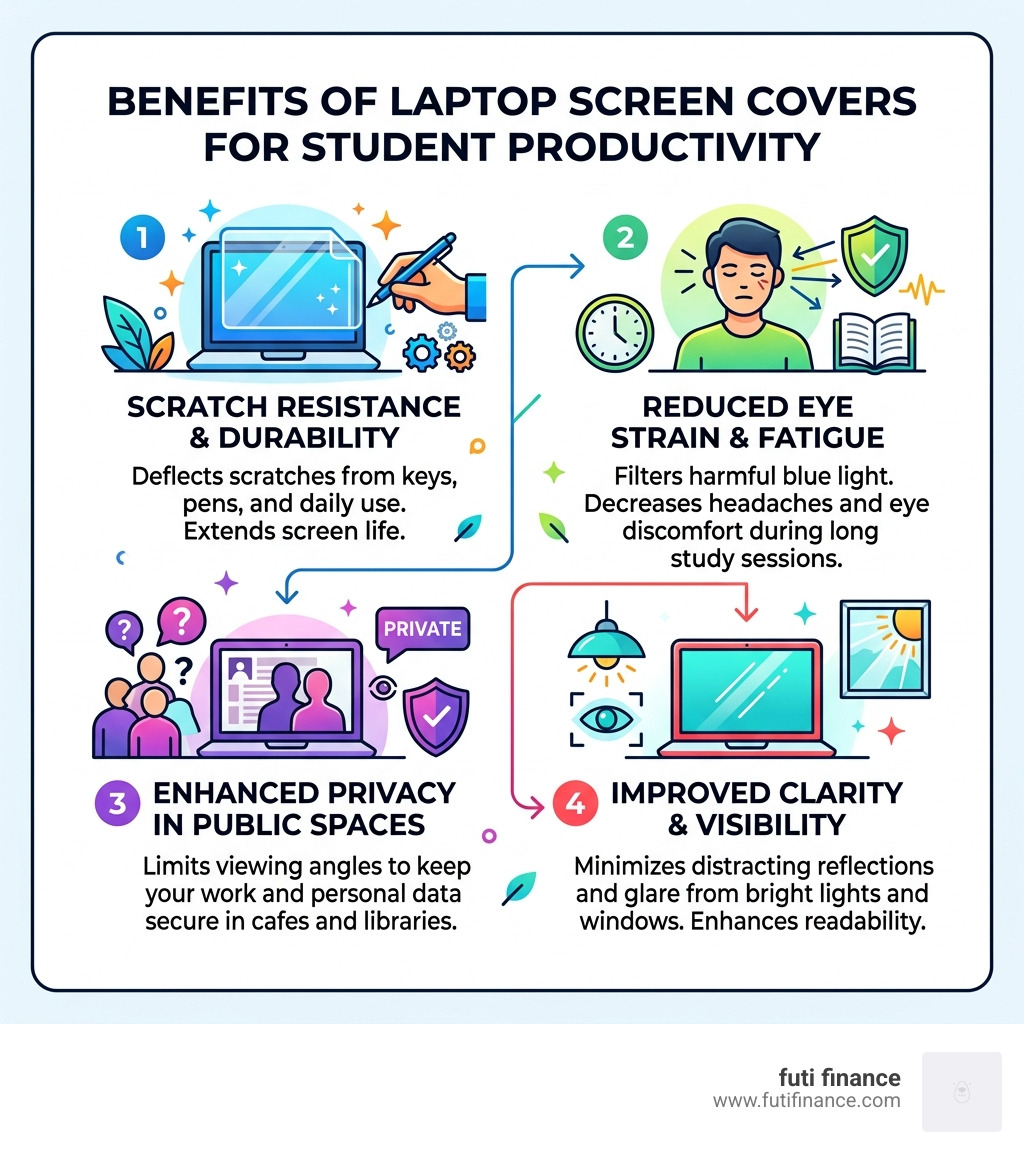
The Essential Benefits of a Laptop Screen Cover for University Students
When we think about campus life in April 2026, we see students who are more mobile than ever. Your laptop isn’t just sitting on a desk; it’s being pulled out of a backpack in a rain-slicked quad, balanced on a tiny lecture hall tray, and shoved into a locker between gym sessions. This “chaotic” lifestyle is exactly why a laptop screen cover university students can rely on is a non-negotiable accessory.
Scratch Resistance and Durability
The primary job of any screen cover is physical defense. Modern laptop screens are surprisingly fragile. A single grain of sand in your bag or a rogue pen tip can leave a permanent mark. By using a screen protector with a 5H hardness rating, you add a sacrificial layer that takes the hit so your expensive Retina or OLED display doesn’t have to. For those who want more than just a film, something like the TMU Laptop Cover – 15 inch — The Outpost provides a branded, sturdy layer of protection for the exterior, while a screen film handles the interior.
Spill Prevention and Daily Commute
We’ve all seen it: a stray latte splash in the library or a sudden April downpour on the way to class. While a screen protector won’t make your laptop waterproof, it does provide a barrier against minor splashes and fingerprints. For students who want maximum “drop-proof” security, pairing a screen protector with a rugged case—like the University of Utah Interlocking U MacBook Air 16-inch Clear Case | Skinit —ensures that the entire chassis is guarded against the bumps and bruises of campus life.

Choosing the Right Format: Adhesive, Magnetic, and Hanging Shields
Not all screen covers are created equal. Depending on how you use your laptop, you might prefer a permanent solution or something you can pop on and off in seconds.
| Type | Best Usage | Key Advantage |
|---|---|---|
| Adhesive Film | Long-term use | Semi-permanent, ultra-thin, budget-friendly |
| Magnetic | Public spaces | Easy to remove for collaborative work |
| Hanging Panel | Dorm desks | Thickest protection, easiest “installation” |
Privacy Filters and Micro-louver Technology
For the student working on sensitive research or just wanting to keep their social media browsing private during a lecture, privacy screens are a lifesaver. These use micro-louver technology, which works like tiny vertical blinds. The user sitting directly in front of the screen sees everything clearly, but anyone looking from a 30-degree angle sees only a black or darkened screen.
The SwitchEasy Magnetic Privacy Screen Protector is a fantastic example of a student-friendly design. It snaps on magnetically, meaning you don’t have to deal with sticky residue, and it often includes a webcam slider for extra peace of mind. If you have a larger device, you can even find precision-cut options like the Universal Laptop 17in University of Utah Skin | Skinit to protect the lid while using a separate privacy filter for the glass.
Measuring Your Laptop Screen Cover for University Students
Before you hit “buy,” you need the right numbers. Don’t just rely on the advertised laptop size (like “15-inch”), as different brands have different bezel widths.
- Measure Diagonally: Measure from the top-left corner of the viewable screen to the bottom-right corner.
- Check Aspect Ratio: Most modern student laptops are 16:9, but MacBooks and some Surface devices use 16:10 or 3:2.
- Width and Height: Measure the actual width and height of the glass area. For example, a standard 15.6-inch screen is usually 13.6 inches wide and 7.6 inches high.
Protecting Your Health: Blue Light and Anti-Glare Technology
University life usually involves “marathon” study sessions. Whether you’re cramming for finals at 2:00 AM or writing a thesis in a sun-drenched park, your eyes are taking a beating.
Reducing Eye Strain and Melatonin Disruption
Digital eye strain is a real medical concern. High-energy blue light (400-470nm) penetrates deep into the eye and can suppress melatonin, the hormone that tells your body it’s time to sleep. A dedicated blue light filter, like the one found in the StarTech 13.3″ 16:9 Flip-Up Privacy Screen w/ Touch, Anti-Glare Blue Light Filter, can block up to 51% of this harmful light.
Anti-Glare for Outdoor Study Spots
There is nothing more frustrating than trying to work on a “glossy” screen while sitting near a window or outdoors. The reflections make you squint, which leads to headaches. An anti-glare laptop screen cover university students use will have a matte finish that diffuses light, making the screen visible even in bright dorm rooms or under harsh library fluorescent lights.
Maintaining Clarity with a Laptop Screen Cover for University Students
A common worry is that a protector will make the screen look “fuzzy.” While cheap films can slightly soften colors, high-quality options maintain over 90% light transmittance. This ensures that your display stays bright and color-accurate. Furthermore, if you use a 2-in-1 laptop, look for “touch-sensitive” labels. Modern protectors are thin enough to maintain full touch responsiveness and stylus compatibility, so your note-taking won’t skip a beat.
Installation and Maintenance for Campus Life
Applying a screen protector can be nerve-wracking—nobody wants that one stubborn bubble in the middle of their screen.
Bubble-Free Application
Most modern protectors, like those from F FORITO, use a nano-silicone absorption layer. This allows the film to “suck” onto the glass without traditional glue.
- Step 1: Use a microfiber cloth and a dust-removal sticker to get the screen perfectly clean.
- Step 2: Align the protector with the top edge of the screen.
- Step 3: Gradually peel the backing while smoothing the film down.
- Step 4: Use a card to push any remaining air bubbles to the edges.
Maintenance and Cleaning
Once installed, your protector needs a little love to stay effective. Avoid using harsh chemicals like window cleaner, which can strip the anti-glare coating. Instead, a quick wipe with a dry microfiber cloth is usually enough. For students on the go, keeping your laptop in a dedicated sleeve like the Case Logic Huxton 15.6in Laptop Sleeve prevents dust and grit from building up on the screen while the laptop is closed in your bag.
Frequently Asked Questions about Laptop Screen Covers
Are screen protectors compatible with touch-sensitive laptops?
Yes! Most high-quality screen covers are designed to be ultra-thin (often less than 0.12mm), which preserves the capacitive touch functionality of the screen. Whether you’re using your finger or a stylus for digital art and note-taking, the responsiveness should remain identical to the bare glass.
How much do quality laptop screen protectors typically cost?
For university students on a budget, the good news is that protection is affordable. You can find excellent 2-pack bundles for around $17.68, which is great if you mess up the first installation. Premium magnetic or “flip-up” privacy filters usually range from $30 to $60. Considering a screen repair can cost $300+, this is one of the smartest investments you can make.
Do these covers provide privacy in public libraries?
Absolutely. A privacy screen is specifically designed for this. It limits the viewing angle to about 60 degrees total (30 degrees to the left and right). If someone is sitting next to you in a crowded library or cafe, they will only see a dark, blank screen. Some models even include a webcam slider to ensure your physical privacy is protected as well.
Conclusion
At Futi Finance, we know that your tech is more than just a gadget—it’s your gateway to your degree and your future. Protecting that investment with a laptop screen cover university students trust is a smart, proactive move. Whether you’re looking for blue light filtering to save your eyes during late-night study sessions or a privacy screen to keep your work secure in the campus cafe, there is an option that fits your budget.
But physical protection is only half the battle. Accidents happen—laptops get dropped, coffee gets spilled, and bags get stolen. That’s where we come in. We provide affordable, intelligent insurance tailored specifically for students and young adults. While a screen cover protects the glass, Futi Finance protects your wallet from the high cost of replacements.
Make sure your “Back-to-School” checklist includes both physical and financial protection. Protect your tech with Futi Finance and head into your next semester with total peace of mind.
